
Toggle (toggle.social) is an iPhone app that opens Instagram, YouTube, TikTok, X, Threads, Reddit, LinkedIn, Facebook and Snapchat inside one app, with the parts built to keep you scrolling switched off: Reels, Shorts, For You feeds, Explore, suggested posts, like counts and more, chosen app by app. Messages, posting, profiles, search and notifications keep working. This page is about one of those parts, like counts, across all nine apps: what each app offers on its own first, then Toggle's switches.
Which apps let you hide like counts natively
Checked in each company's help centre on October 24, 2026. "Counts you see" is the switch that matters for scrolling: it removes the numbers on other people's posts. "Your posts" changes what others see on yours.
| App | Counts you see | Your posts | Where (from the help page) | Since | Toggle on iPhone | Toggle for Chrome |
|---|---|---|---|---|---|---|
| Yes | Yes, per post | Settings → What you see → Like and share counts → Hide like & share counts | May 26, 2021 | Hide Like counts | Like counts | |
| Yes | Yes, all your posts | Settings & privacy → Settings → Reaction preferences | May 26, 2021 | Hide Like counts | Like counts | |
| Threads | Yes | Yes, per post | Settings → Content preferences → Hide like and share counts | Not dated in the help page | Hide Like counts | Like counts |
| YouTube | No | No | Only your own activity can be made private | n/a | Hide Like counts | Like counts |
| TikTok | No | No | Help pages list no setting | n/a | Hide Like counts | No switch |
| X | No | No | Help page covers liking and unliking only | n/a | Hide Like counts | Like counts |
| No user setting | No | Votes hidden for the first hours; communities may hide comment scores for a while | n/a | Hide Like counts (votes) | Like counts | |
| No | No | Help pages list no setting | n/a | Hide Like counts (reactions) | Like counts | |
| Snapchat | n/a | n/a | Chats carry no like counts | n/a | No switch (chat only) | Grayscale only |
The Chrome extension also has one switch above the per-site ones: hide like counts everywhere.
Instagram: Settings → Like and share counts
Instagram's help page "Hide or unhide like counts on Instagram posts and reels" gives two settings. For posts and reels you see: open Settings, then under What you see choose Like and share counts, and turn on Hide like & share counts. For your own posts: before sharing, Advanced settings, then Hide like and view counts on this post; a shared post can be changed from its menu. You still see the total on your own posts. Instagram announced both on May 26, 2021, as "the option to hide like counts on all posts in your feed" and on your own posts. The Instagram page maps where this sits among Instagram's other surfaces.
Facebook: Settings → Reaction preferences
Facebook's two help pages describe one screen with two switches. Settings & privacy → Settings → Reaction preferences, then On other people's posts and reels hides "the total number of reactions on all ads in Feed and posts and reels that other people create"; you can't hide it on individual posts, and you can still tap the words next to Reactions to see who reacted. On your posts and reels hides the totals on posts you create from your timeline or Feed, but, the page says, people "will still see the total number of reactions on posts and reels that you create from other places like Groups, Events and Pages". Both arrived with Instagram's on May 26, 2021. More on Facebook's surfaces on the Facebook page.
Threads: Settings → Content preferences
Threads has the same pair. For posts you see: More → Settings → Content preferences → Hide like and share counts, which hides "the number of likes, views, reposts and quotes for posts you see from other profiles". For your own: open the menu next to a post and choose Hide like and share counts. The help page carries no date for either. Threads opens in Toggle on Following; the Threads page covers the rest.
YouTube, TikTok, X, Reddit, LinkedIn, Snapchat: no switch
YouTube's "Hide or show likes & saved playlists" sounds like one but isn't: it keeps your liking and subscribing out of your public activity, and the page itself says videos "will still show the number of likes". YouTube's November 10, 2021 post made dislike counts private and left likes public. See YouTube for what YouTube does and doesn't let you change.
TikTok's support pages on the For You feed describe Not interested, keyword filters and refreshing the feed; none hides like counts. X's help page on likes explains how to like and unlike a post and nothing more. Reddit hides vote counts in two cases, neither yours to choose: "the first few hours after a post is created" and in communities that hide comment scores "for a short amount of time", both against vote manipulation. LinkedIn's help centre lists no setting for reaction counts. Snapchat's chats have no like counts to hide.
How to hide like counts on all nine apps with Toggle
- On iPhone, install Toggle (iOS 17 or later), open an app from the launcher and sign in with your own account. Logins stay on your iPhone; there is no Toggle account.
- Hold the Toggle switch at the bottom of the app to open the options sheet, and turn on Hide Like counts. It applies at once, and only to that app, so you can hide counts on Instagram and keep them on Reddit.
- Repeat in each app you want: Instagram, YouTube, TikTok, X, Threads, Facebook, Reddit (votes) and LinkedIn (reactions). Snapchat in Toggle is chat only and has no count to hide.
- On a computer, install Toggle for Chrome and turn on hide like counts everywhere at the top of the popup, or use the Like counts switch per site. Changes apply with no reload.
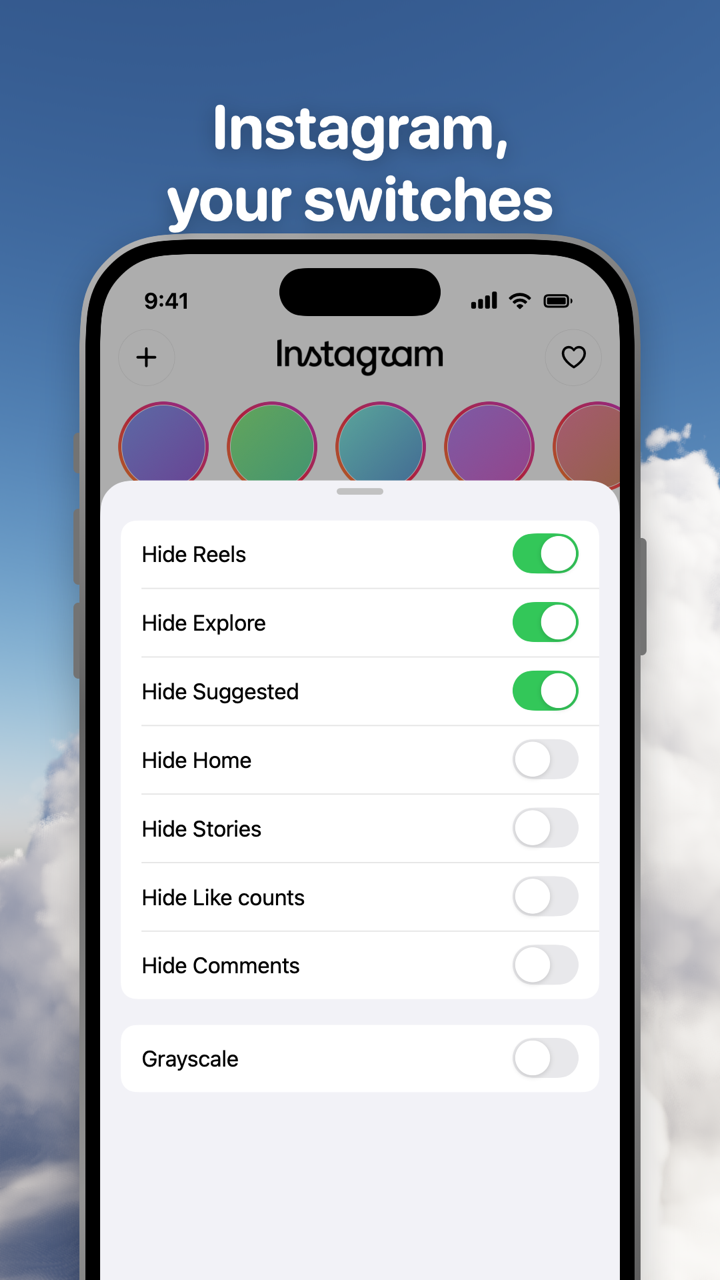
Toggle's switch is for your own screen. It doesn't change what anyone else sees on your posts; for that, the native settings above are the only way.
Where Toggle is not the answer
If you only use Instagram, Facebook or Threads, their own settings do this for free and reach the real apps. Toggle is iPhone only, with no Android app, and the iPhone app is free to download and paid after the 7-day trial (see pricing). The Chrome extension is free, works on the desktop sites, and is the option for Android and Windows users at a computer. Each app in Toggle is its mobile website in a native shell, so when a site changes its markup a switch can stop working until Toggle updates. Toggle for Safari is coming to the Mac App Store.
Questions
How do I hide the like count on Reels?
Instagram's setting covers posts and reels together: Settings, then Like and share counts under What you see, then Hide like & share counts. Facebook's Reaction preferences also covers posts and reels. In Toggle, Instagram's Hide Like counts switch applies to whatever Instagram shows, and Reels are hidden anyway.
Can I hide like counts on my own posts without hiding everyone else's?
Yes on Instagram, Facebook and Threads. Instagram offers it under Advanced settings before you share and on a shared post; Facebook under Reaction preferences, On your posts and reels; Threads from the menu on each post. Those are separate from the switch for counts you see.
Does YouTube have a way to hide like counts?
No. YouTube's Hide or show likes and saved playlists setting keeps your own liked-videos activity private; it doesn't remove the number under a video. YouTube made dislike counts private on November 10, 2021, and said videos would still show the number of likes.
Can I hide upvotes on Reddit?
There is no user setting. Reddit itself hides votes for the first hours after a post, and some communities hide comment scores for a while, both to limit vote manipulation. Toggle's Reddit switch Hide Like counts (votes) hides them for you all the time.
Does hiding like counts change what other people see?
The switch for counts you see (native or Toggle's) changes only your screen. Only the native settings for your own posts on Instagram, Facebook and Threads change what others see on your posts.
Does Toggle hide like counts on a computer?
The free Chrome extension has a Like counts switch on Instagram, YouTube, X, Threads, Reddit, LinkedIn and Facebook, and one switch at the top of the popup that hides like counts everywhere. It works on the desktop sites, with no account.
Sources
- Instagram blog: Giving People More Control on Instagram and Facebook (May 26, 2021) (accessed 2026-10-24)
- Instagram Help: Hide or unhide like counts on Instagram posts and reels (accessed 2026-10-24)
- Facebook Help: Hide or unhide the number of reactions on other people's posts and reels (accessed 2026-10-24)
- Facebook Help: Hide or unhide the number of reactions on your posts and reels (accessed 2026-10-24)
- Threads Help: Hide the like and share counts of a post on Threads (accessed 2026-10-24)
- YouTube Help: Hide or show likes and saved playlists (accessed 2026-10-24)
- YouTube Official Blog: An update to dislikes on YouTube (November 10, 2021) (accessed 2026-10-24)
- X Help Center: How to like a Post (accessed 2026-10-24)
- Reddit Help: Why can't I see how many upvotes a post or comment has sometimes? (accessed 2026-10-24)
- TikTok Support: For You (accessed 2026-10-24)