Can you turn off suggested posts on Instagram?
For 30 days at a time. Instagram's control for the "Suggested for you" posts in your Home feed is a snooze: tap the X on one of them, choose "Snooze all suggested posts for 30 days", and they are gone until day 31. Instagram described the control that way on August 30, 2022, and as of October 24, 2026 I found no announcement of a longer option or a permanent one. The Following feed shows no suggestions either, but you pick it from Home each time; the app itself opens on Home.
Toggle (toggle.social) is an iPhone app that opens Instagram, YouTube, TikTok, X, Threads, Reddit, LinkedIn, Facebook and Snapchat inside one app, with the parts built to keep you scrolling switched off. On Instagram, its Hide Suggested switch is on when you start, and it stays on until you change it: a switch rather than a snooze. The rest of your Home feed, Stories, DMs, posting and search keep working. This page is only about suggested posts; the hub Instagram without the scroll covers every other surface, and Reels and Explore each have a page of their own.
How to snooze suggested posts for 30 days
- Open Instagram and scroll your Home feed until you reach a post marked "Suggested for you".
- Tap the X at the top right of that post (or the three-dot menu, then Not interested).
- Tap "Snooze all suggested posts for 30 days".
Suggested posts leave your Home feed. The Reels tab, Explore and suggested Reels inside them are untouched; the snooze is a Home feed setting. On day 31 the suggested posts return and the steps start over. There is no reminder when the snooze ends, so most people notice when a stranger's post appears between two friends.
Why suggested posts come back
Instagram's feed used to end. On July 2, 2018 it added "You're All Caught Up", a line that appears "when you've seen every post from the last two days" from accounts you follow. For a while the posts beneath that line were older ones. Then came suggestions: posts "from accounts you don't follow but may be interested in", in Instagram's words, shown below the line and, in the current app, between posts from people you follow as well. The line still appears, and the feed no longer ends at it.
A feed that never ends is the product. A permanent off switch for suggestions would give back the stopping point the 2018 line created, so Instagram offers the 30-day version and the per-post Not interested instead, both of which keep the suggestion system running while you adjust it. Why a feed with no end is hard to leave is covered in its own guide on this site.
Every Instagram control for suggested posts, and how long it lasts
Checked October 24, 2026. Menu labels move between versions; search Settings and activity for the name if a path has changed.
| Control | Where | How long it lasts | What it touches |
|---|---|---|---|
| Snooze suggested posts | X on a suggested post in Home | 30 days, then repeat | Suggested posts in Home |
| Not interested | Three-dot menu on a post or Reel; multiple at once in Explore | Per post; trains the ranking | Which posts are suggested, in Home, Reels and Search |
| Following feed | Instagram logo on Home, then Following | Until you leave the view | Shows only accounts you follow, newest first, last 30 days |
| Favorites feed | Instagram logo on Home, then Favorites | Until you leave the view | Only the accounts you added, up to 50 |
| Reset suggested content | Profile, More options, Content preferences | Until it relearns you | Recommendations across Explore, Reels and Feed |
| Sensitive Content Control | Settings and activity (Standard, More, Less) | Until you change it | How much upsetting content is recommended from accounts you don't follow |
| Toggle: Hide Suggested | Toggle's options sheet, Instagram | Until you turn it off | Suggested posts in Home |
The Following and Favorites feeds
Tap the Instagram logo at the top left of Home. Following shows "posts just from accounts you follow, starting with the most recent post first" with "no suggested posts in this view", going back 30 days. Favorites does the same for up to 50 accounts you choose, and those accounts also rank higher in the normal Home feed. Both are the closest thing Instagram has to a feed without suggestions, and both are views you select after the app has opened on Home. A page on landing in the Following feed every time is coming to this site.
Reset suggested content
Profile, the three-bar More options icon, Content preferences, Reset suggested content. Meta announced it on November 19, 2024: it clears "your recommended content across Explore, Reels and Feed" and offers to review the accounts you follow while you're there. Your recommendations "will start to personalize again over time". A reset changes which posts are suggested, starting from scratch. It does not change whether posts are suggested; the first one appears as soon as Instagram has something to show.
Sensitive Content Control
Standard, More or Less sets how much content Instagram thinks you might find upsetting shows up in Explore, Search, Reels and in-feed recommendations, from accounts you don't follow only. It is a safety filter, not a volume knob: Less does not mean fewer suggested posts.
Toggle's Hide Suggested switch: on when you start
In Toggle, Instagram's Hide Suggested switch is on from the first load. Suggested posts leave the Home feed and don't come back on day 31, because there is no day 31; the switch stays where you put it. Unlike Toggle's Hide Reels and Hide Explore, which are locked and can only be shown for five minutes at a time, Hide Suggested can be turned off whenever you want suggestions back.
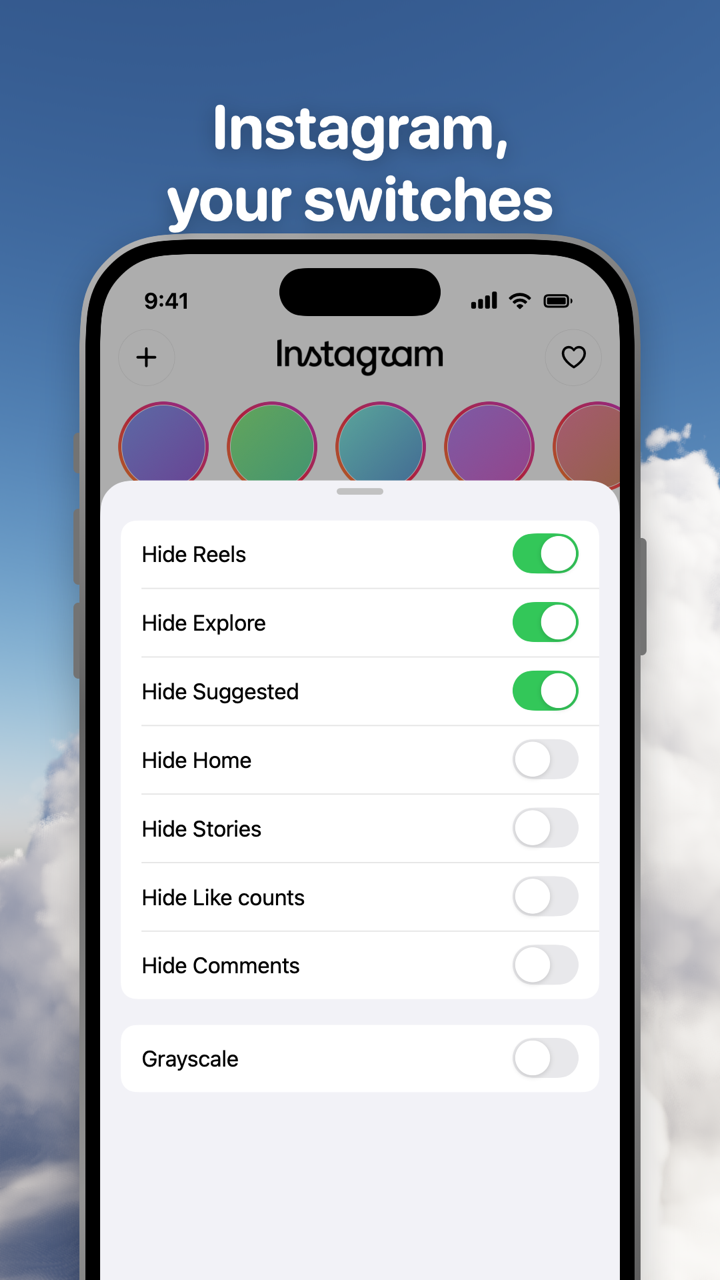
Hold the Toggle switch at the bottom of Instagram for a moment to open the options sheet. Hide Suggested sits with the other Instagram switches: Hide Reels and Hide Explore (always on), and Hide Home, Hide Stories, Hide Like counts, Hide Comments and Grayscale, which are off when you start. Changing a switch applies at once, and turning a hidden part back on reloads only what needs it.
Your Home feed with Hide Suggested on is posts from accounts you follow, with Stories above unless you hide them. Direct messages, posting, profiles, search and notifications keep working, and comments open in a native sheet. You sign in to Instagram directly; Toggle has no account system and the cookies stay on your iPhone.
Where Toggle isn't the answer
Toggle runs on iPhone (iOS 17 or later). There is no Android app; on a computer the free Chrome extension has a Suggested switch for instagram.com. The iPhone app is free to download and paid after the 7-day trial, $6.99 a week or $99 a year in the US on October 24, 2026, with the details on Toggle pricing. If you want suggestions gone for free, the honest list is the 30-day snooze on your phone and the extension on your computer.
Toggle uses Instagram's mobile website inside a native shell, so a few app-only features may be missing, and when Instagram changes its pages a switch can stop working until Toggle updates. If the real Instagram app stays on your phone, its feed is unchanged; Toggle can block it with Apple's Screen Time, an optional step covered in Block the real apps with Screen Time.
Questions
How do I turn off suggested posts on Instagram permanently?
You can't in the Instagram app; the longest it offers is a 30-day snooze from the X on any suggested post. A permanent version needs a different client: Toggle on iPhone hides suggested posts by default, and the free Chrome extension does the same on instagram.com.
Why do suggested posts come back after 30 days?
Because Instagram built the control as a snooze. Its August 2022 announcement describes it as 'snooze all suggested posts for 30 days', and the app offers no longer option. When the 30 days end, the posts return until you snooze again.
Does the Following feed have suggested posts?
No. Tap the Instagram logo at the top of Home and choose Following to see only accounts you follow, newest first, from the last 30 days, with no suggested posts. It is a view you pick from Home; the app opens on Home.
How do I stop my Instagram account from being suggested to other people?
On instagram.com, Edit profile has a checkbox called Show account suggestions on profiles. Turning it off stops your account appearing as a suggestion on similar profiles. It is a different setting from suggested posts in your own feed.
What does 'You're all caught up' mean?
Instagram added the marker on July 2, 2018 to show you've seen every post from the last two days from accounts you follow. Posts under it are older or suggested.
Is there a way to take a break from Instagram posts without deleting the app?
Instagram's own tools are a daily time reminder and Sleep mode, which silences notifications on a schedule and auto-replies to DMs. Neither hides posts. Toggle's Hide Home switch hides the feed while messages, profiles and search keep working.
Sources
- How to See More of What You Want on Instagram (Instagram, August 30, 2022) (accessed 2026-10-24)
- Introducing 'You're All Caught Up' in Feed (Instagram, July 2, 2018) (accessed 2026-10-24)
- Reshape Your Instagram With a Recommendations Reset (Meta, November 19, 2024) (accessed 2026-10-24)
- About Sensitive Content Control on Instagram (Instagram Help Center) (accessed 2026-10-24)
- Instagram Quiet Mode: a new way to manage your time and focus (Meta, January 19, 2023) (accessed 2026-10-24)
- Set a reminder for time spent on Instagram (Instagram Help Center) (accessed 2026-10-24)